Mastering the Rainbow Holographic Foil Texture Vector
There is a specific kind of visual magnetism that happens when light hits a surface just right, creating a spectrum of shifting colors that feels almost alive. In the world of digital design, capturing that ethereal, high-end look has traditionally been difficult. However, the Rainbow Holographic Foil Texture Vector changes the game entirely. This collection is not just a static image; it is a versatile set of design assets that brings the futuristic, iridescent appeal of holographic materials directly into your creative workflow. Whether you are a seasoned graphic designer or a small business owner trying to elevate your packaging, understanding how to wield this texture effectively is key to creating modern, eye-catching visuals.
The Visual Anatomy of Holographic Design
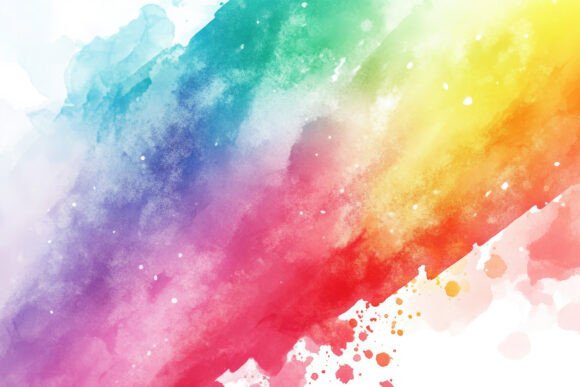
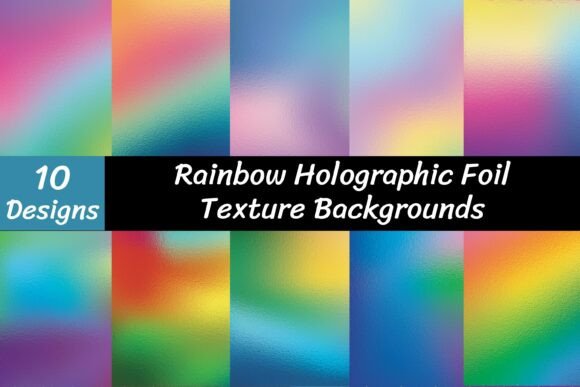
To use this asset effectively, you first have to understand what makes it tick. The Rainbow Holographic Foil Texture Vector is defined by its complex interplay of light and color. Unlike a standard gradient, which moves linearly from one hue to another, this texture mimics the behavior of actual physical foil. It features a "glass effect" and deep, reflective tones that shift from violet to cyan, magenta to gold, depending on the angle of the "light." It feels tactile. When you look at the JPEG previews (rendered at a crisp 4000 x 2250 pixels), you can almost feel the smooth, metallic surface.
The personality of this texture is bold, luxurious, and undeniably modern. It screams "premium." In an era where digital fatigue is real, static flat colors often get scrolled past. A holographic foil texture, however, introduces depth and complexity. It suggests that the brand or project using it values quality and is tuned into current design trends. The visual style bridges the gap between cyberpunk futurism and high-fashion elegance, making it a surprisingly adaptable background for a variety of moods.
Strategic Applications for Brand Identity and Marketing
Knowing what the texture looks like is one thing; knowing where to deploy it is where the real strategy lies. For brand identity, this texture is a powerhouse for logos and visual marks, particularly for brands in the beauty, tech, entertainment, or lifestyle sectors. If you are designing a logo for a cosmetics line or a music festival, overlaying your typography with a holographic vector can instantly communicate "trendy" and "high-energy." However, it works best as an accent. A full logo made entirely of this texture might lose legibility, so consider using it for the icon or a specific letterform while keeping the text clean.
In packaging design, the appeal is obvious. We are conditioned to associate holographic finishes with limited editions and special releases. Using this vector in your mockups allows you to visualize how a product box or label will catch the light on a shelf. It is particularly effective for health and wellness supplements, artisanal candies, or tech accessories. The texture creates an immediate visual hierarchy, drawing the eye to the product before the customer even reads the copy.
For digital applications, the versatility continues. In social media graphics, stopping the scroll is the primary objective. A background featuring the rainbow holographic foil texture makes text pop and creates a celebratory atmosphere. It is perfect for announcements, sale banners, or podcast cover art. In web design, while you might not want a full-screen animated holographic background (due to load times and distraction), using it for hero section headers, button backgrounds, or dividers can add a sophisticated layer of polish to the user interface.
Typography and Readability: The Critical Balance
The biggest pitfall when working with a premium font or a complex texture like this is sacrificing readability for style. Because the Rainbow Holographic Foil Texture Vector is visually "noisy" with its shifting colors and reflections, it demands careful typographic pairing. You cannot simply slap a script font or a highly detailed serif font on top of a full-bleed holographic background and expect it to be readable.
Instead, lean into contrast. If you are using the texture as a background, choose a bold, geometric sans serif font for your headlines. The clean, straight lines of a modern sans serif will cut through the organic fluidity of the holographic effect. Alternatively, if you are using the texture to fill your typography (making the letters themselves holographic), use a heavy, thick display font. Thin strokes will get lost in the color shifts, but a bold weight allows the texture to shine without breaking the letterforms.
Consider the "glass effect" mentioned in the file description. This adds a layer of refraction that can darken certain areas of the texture. When placing text, ensure there is enough contrast between the text color and the average value of the texture beneath it. A common technique is to place a semi-transparent shape or a subtle shadow behind the text to ensure it floats above the background noise.
Technical Mastery: Working with the Assets
The true power of this specific download lies in its file types. You are provided with 10 EPS files and 10 high-resolution JPEGs. For the uninitiated, the JPEGs are raster images—essentially digital photographs of the texture. They are fixed in resolution (4000 x 2250 pixels) and are perfect for quick social media posts or website banners where you don't need to scale the image up infinitely.
However, the EPS files are the real gems for professional logo design and packaging design. EPS stands for Encapsulated PostScript, a vector format. This means the texture is defined by mathematical curves rather than pixels. You can scale a vector file to the size of a billboard or shrink it down to a favicon without losing a single bit of quality. This is crucial for brand identity work, where your logo needs to look crisp on a business card and a shop window.
When you download the zip file, ensure you have unzipping software ready. Once extracted, you can import these vectors into Adobe Illustrator, CorelDRAW, or Affinity Designer. Because they are vectors, you have the flexibility to edit anchor points, change colors, or mask the texture into specific shapes. This level of control is what separates amateur designs from professional design assets.
Evaluating Fit and Commercial Licensing
Before incorporating the Rainbow Holographic Foil Texture Vector into your next big project, pause to evaluate the fit. Does the holographic style align with your audience? While it resonates strongly with Millennials and Gen Z, it might feel out of place for a brand targeting a conservative, traditional demographic (like a law firm or a heritage bank). It fits best with brands that want to project innovation, creativity, and fun.
From a practical standpoint, always review the licensing. Since these are commercial assets, you need to ensure your usage covers your specific needs, whether that is for a client project, merchandise for sale, or digital products. The value of these assets is that they save you hours of trying to render 3D glass effects or metallic gradients from scratch.
Ultimately, the Rainbow Holographic Foil Texture Vector is more than just a pretty picture; it is a strategic tool. It allows designers and creators to tap into the psychological appeal of light, color, and luxury. By pairing it with the right typography, utilizing the vector scalability for print, and applying it to the right brand personality, you can transform a standard design into something truly memorable. Whether you are crafting a social media campaign or designing a web design hero image, this texture provides the modern, polished finish that today’s visual landscape demands.